
-
Feature
-
Interface
-
File Operation
-
Design Central
-
Basic Setting
-
Viewing Tools
-
Object Operation
-
Drawing
-
Parametric
-
Graph Editing
-
Graph Transform
- Move
- rotate
- Transform Again
- Mirror
- Arc and Line Fit
- Envelop Distortion
- Perspective Distortion
- Push and Pull Distortion
- Twist Distortion
- Shadow Distortion
- Curve Zmap
- Auto Nesting
- Interactive Nesting
- Clone Along a Curve
- Rectangular Clone&Polar Clone
- Clone along a Line
- Clone along an Arc
- Clone along a Spiral
- Scale 2 Points
- Orient 2 lines
- 3D Move
- 3D Rotate
- 3D Scale
- 3D To XY Plane
-
Image Processing
-
Text Editing
-
Node Editing
-
Graph Toolpath
- Tool Path
- Profile Machining
- Area Clearance
- Flute Machining
- 3D Corner Engraving
- Midine Machining
- Drilling
- Insert And Inlay
- Intelligent Machining
- Prism Machining
- Embossing Machining
- Toolpath output
- Tool Management
- Toolpath Walk Simulation
- Toolpath Shaded Simulation
- Post Set
- Toolpath Regenerate
- Toolpath Stat
- Chamfer Machining
- Adaptive Area Clearance
-
Image Toolpath
-
Wireframe Toolpath
-
Toolpath Edit
-
Waveboard
-
Mesh
-
Relief Sculpt
-
Surface
- Surface
- Import Surface File
- Standard Surface
- Freeform Surface
- Chamfer Surface
- Fillet Surface
- Extend Surface
- Show Effect
- To 3D Curve
- Curve Project to Surface
- Pullback
- Extract Edge
- Split at Isocurve
- Trim at Curve
- Trim at Surface
- Untrim
- To Mesh
- Edit Node of Surface
- Insert Control Point
- Vari Fillet Surfaces
- 3D-Spline
- Surface Flatten
- Mesh Wrap
-
Canvas 3D
-
Surface Toolpath
Vari Fillet Surfaces
Command:
Menu 【Surface: Vari Fillet Surface】
Steps:
1、Select the graphics,click the right button of the mouse to choose the menu” decompose the graphic”.
2、Choose the menu:【Surface>Vari Fillet Surfaces】.
3、Press the “shift”key and as the same time click adjacent to two surfaces of the graphics.
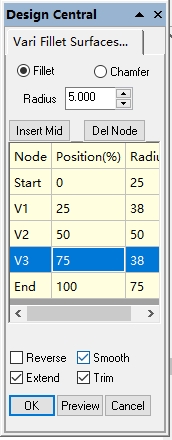
4、Set in the dialog box:
Diameter: it means the diameter of the Fillet Surface。You can set the different radius value and click the button “preview” to observe the effect.
To insert the midpoint: to insert the midpoint by dragging the mouse from the start point or the end point; or click the button”insert the mid” to add the midpoint.
Delete the midpoint: select the line about the midpoint to be deleted or click the button”delete”.( the start point and end point can’t be deleted).
Tick”smooth”checkbox: between the sections, the variation of the radius among
The nodes demonstrates the parabolic change rules.
Not tick ”smooth”checkbox: between the sections, the variation of the radius among the nodes demonstrates the linear change rules.
5、Click “ok” button to finish the operation.